Podcasting
I’ve been thinking about doing a podcast for a while and now I’ve finally done one!
Its a bit rough around the edges but it covers the following subjects:
In the podcast I talk about the Google V microsoft slagging match, RIM new handsets, Android revenue issues and the new HP Touchpad!
CreativeDevelopers
Southend gets a lot of stick, some of it deserved, some out of spite and it annoys me.
In the last ten years or so, Southend has gone though a lot of changes and had a lot of money invested in regeneration (see pier entrance, new highstreet), the College has grown in size and we have a new University campus.
And yet the snide comments continue to rear their heads, and I think its a shame.
I know that Southend has a vibrant student/creative and technology community but that its rarely seen, so I’ve decided to setup a Meetup group to see what we actually have. My aim is first and foremost to get people together, you dont have to be interested in Arts, Music, Literature or Technology.
Just be interested and we’ll go from there.
So this can go one of two ways, either It will be a spectacular success or not, either way I would love for you to get involved http://www.meetup.com/creativedevelopers/
Hook, line and sinker: My thoughts on pitching an App
I was recently a judge at the ‘Muther of All Hackathons’, a 36 hour developer event at the Computer History Museum in Mountain View California. The concept was simple, you get 24 hours to develop an app using a variety of API’s and services and then you pitch your App to your peers and judges to get awesome prizes.
Developers had 3 minutes to sell their App and the previous 12 hours will have been for nothing if they could not get their point across. A good app can be destroyed by a poor or confusing pitch, we the judges had 3 minutes to assess the App, its purpose, innovation, marketability and overall quality. Sadly some of the teams had not heeded the advice in the previous days panel.
Pitching is not easy, especially to a room of 300 or more people, here’s some advice for the future:
- If you want to succeed, you need to set aside some time to practice your pitch in front of your team as it will help you separate the important facts from the waffle.
- If your App crashed, don’t panic about it and keep talking! Bugs happen at the worst times
- Practice your pitch some more
- In the first minute you will have the most attention, cover the important stuff first: App name, purpose.
- Under five minutes to pitch? Don’t read out your CV or give a history lesson.
- Never say “This is the most/best/revolutionary X”, if it is trust in your audience to realise it
- Although bugs happen, test every thing you will be demonstrating, then get someone 100% new to your product to test it
- You don’t have to demonstrate all features, just the ones that best showcase your App
- If you have time, offer a summary of the product, you may have have sped through your demo due to nerves, recap and help the people listening to you
- Breathe, the worst that can happen is that they say no, remember they are people just like you!
- Prepare to back up any claims stated in your pitch, judges/panels etc will more than likely test them!
- Lastly, try to enjoy yourself, thinking “I hate presenting” is a self fulfilling prophesy
There are many more tips but those are the essential I think, got something to add to the list? Get in contact!
Preamble: INNTW reviews the Pre 2
I had an rough relationship with the Palm Pre last year, I loved the platform but in the end swapped it for an iPhone 4. The reasons were simple, poor quality hardware and sub par performance.

Pre 2
As highlighted in my earlier posts, I dont tend to use many apps, sure on my iPhone I have plenty installed but my core are twitter, facebook and safari. Secondary Apps are lightbike and kindle. Shocking I know, but those are my main uses of both my iPhone and my iPad.
Kindle is coming to webos but sadly I think light bike is but a dream…
Still I had the Pre – for around two weeks and it went from being a techno joy to being just plain annoying, I suspect that the fact that although my app need were satisfied, ‘this was as good as it gets’ put a dampner on things. Combine this with the dissapointing build quality and sluggish performance (I did overclock it but I feel it should be optional rather than mandatory) meant that the Pre and I were doomed.
So why am I posting about the Pre 2? Well as said I’m a big fan of the WebOS platform and when Palm announced it was setting up a developer device program, I signed up immediately. A couple of months later (due to the overwhelming popularity of the program) and I recieved my Pre 2.
So what’s it like? Pretty impressive.
It corrects many of the Pre’s deficiencies, the touchstone coating over the entire surface of the Pre makes it much nicer to hold, I suspect it will pick up less scratches that the hard plastic of the Pre -. Further enhancing the Pre 2 is the redesign of the front of the phone. These consist of two changes, first (and arguably most importantly) a change to a Gorilla Glass screen. The plastic screen of the Pre – was a real let down for me, it just made it feel cheap and it scratched incredibly easily. The other major change is recessing the ear piece, it’s a simple change but it creates a very iPhone like appearence and brings the Pre 2 closer to a premium device.
The keyboard is much improved, I had found myself getting more and more frustrated with the onscreen keyboard of the iPhone 4, so the transition was welcome. The key action is more satisfying and I find myself making far less mistakes, the cheese grater edge is still present. However, the slider seems to be the same sadly and there is ‘Oreo shimmy’ present, which jars slightly with the rest of the improvements, I don’t have great confidence that the Pre 2 will handle a short fall any better than the original.
Performance is a strange combination of improved and sluggish, launching apps is much improved and TMC has not reared it head just yet. The touchscreen seems to be far less accurate than that of the iPhone 4, I’m not sure of the reason but I find that in some instances, multiple presses are required to make the phone recognise the button press. There are also noticeable pauses when using the gesture area, especially if you switch on ‘advance gestures’.
Now lets get on to the important bit, software.
The changes in WebOS are stunning, I love just type.
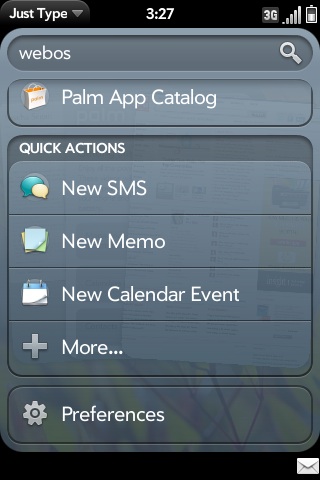
Just Type
It enables me to quickly and easily find/search both locally and on the internet. For example If I wanted to find out where Pecroino Sardo came for, I simply swipe up and start typing and I can choose to search for it using twitter, wikipedia and the internet. I can also instantly see how many emails and messages contain that term. You can also add custom search engines (e.g. WordPress), if a website supports just type a notification will pop up at the bottom of the screen and you can install it.

Stacks
Stacks, are a simple but very well thought out idea. As we know WebOS is a true multitasking OS but having multiple cards open can make linked information hard to track. Stacks solve this by stacking (shocking I know!) related items on top of each other. So if I have an email with a hyperlink in it, if I choose to open that link it will stay with that email rather than go to the end of the card list. Both are brilliant ideas and available no where else, these are the features that HP need to be screaming from billboards, but that’s a different subject for another time.
Overall the Pre 2 is an improvement, its not perfect but I am making it my main phone, which is as close to a ringing endorsement as you can get.
HP TouchPad in Education, an opportunity?
State of the Union:

HP TouchPad
- #1: The iPad is the only tablet around in the mind of the consumer, that 90% market share that Apple cited during the iPad 2 launch is no joke.
- #2: The iPad is not perfect
The iPad has driven tablet prices to a hitherto impossible level (see the multitude websites stating the iPad 1 would launch for £999 or similar) and most if not all tablet manufacturers are a year later still scrabbling to catch up. I don’t think that Apple will cede the number one position anytime soon, the total ecosystem it offers is difficult for individual suppliers to combat.
As we all know the UK Education market has been ravaged by cuts and tightening of ICT budgets, institutions nationwide (and globally for that matter) are having to do more with less. At the same time mobile devices are becoming more prevalent both in and outside of education. The iPad has achieved two things, first its created the mindshare for what tablets can do and secondly its raised the bar for what is acceptable for a tablet.
This is a doubled edged sword as its created demand for the device but at a time where investing £399 in a mobile device is difficult to justify.
This become all the more difficult when you try to integrate the iPad into your existing education environment:
- iPads offer no access to the file system so do not work with VLE’s (i.e. you can’t upload into areas)
- Schools can’t use systems like drop box due to third party data protection issues
- You cannot bulk specify a proxy, even with the iPhone configuration meaning that a tech will have to manually enter it on each iOS device (fine for one class, not for an entire school)
- A iPad can only sync with a total of five machines, yet does not offer any out of the box cloud/wireless ways of transmitting content
- iPads are poor content distributors i.e. give a student a task that requires them to create and then share content with the teacher and it will in most cases require 3rd party work arounds
In short the iPad creates fundamental barriers to integrating it into education and Apple is unwilling to help ‘We’re not looking to go in that direction’ is a response I’ve received from an Apple engineer when discussing the above issues. In spite of this, they are the number one requested item by teachers and because of this I think that HP has a distinct opportunity to flourish in the education sector as the only credible alternative to the iPad.
Lets not forget the elephant in the room, Android.
Android tablets fall into two catagories, cheap and nasty or prohibitively expensive. Add to this the lack of a consistant UI (although this may change with Honeycomb) and a lack of tablet formatted apps stacks the deck against wide scale adoption of the platform.
Try to convince a user:
- ‘So it’s cheaper than the iPad?’ No
- ‘Ah so that means it must be lighter!’ No
- ‘But it must have hundreds of tablet Apps!’ No
What is the incentive for the user to invest?
This is the issue that manufacturers of Non – iPads face, everything you do, all of your services are going to be compared to the iPad, whenever I talk about the Xoom, TouchPad to people the word tablet fails to have any resonance ‘Oh you mean an iPad…’. Manufacturers need to understand is that the product they are going to buy is an iPad, unless you give them a damn good reason not to. This is clearly demonstrated by the lack of interest in the Motorola Xoom despite having impressive specifications 1280 * 800 resolution screen, 1GB ram, dual core processor etc it means nothing to most users.
TLDR? In short being better wont win the war.
So is HP doomed? I’m not sure.
At WebOS Connect I saw a presentation by Ben Tattersley on his experience as a both Student learning WebOS and as Teacher showing others how to develop WebOS Apps. Ben went on to discuss the success of teaching students WebOS because of the low cost of investing in the platform due to its HTML/Javascript nature. That means a student does not need to buy a new Mac or PC , they can develop everything they need at home and in School.
And it hit me, there’s the hook, the USP for use of the TouchPad within education, it goes a little something like this:
- Offer a slight discount on the hardware, it doesn’t have to be massive but enough for the cheapest model to undercut the 16gb iPad
- Offer a training program for Teachers to learn about WebOS and how develop Apps for themselves
- Offer on site support to those Teachers when they teach these classes
Think of the PR potiential of the above:
- The School gets devices at a discount
- Students get not only access to devices but learn marketable skills for the future
It means that HP doesn’t just sell devices, it offers the those that invest in the TouchPad opportunities to enhance their Students career potential.
Apple is doing everything it can to hold itself back in the market, HP has a real chance to capitalise on it but only if it offers something different.
The day after the night before
“In short HP needs to hit the ball out of the park tonight”
So ended my previous post on my expectations of yesterdays WebOS Connect, so did it? Yes and no.
Ignoring the venue (Bar Music Hall, Shoreditch – which was great), I want to focus on what I wanted form the event, namely details of how HP is going to support developers and get its products to market.
What information we actually got was scant, I’m glad HP has heard the complaints/issues of developers:
- Lack of a universal App Catalog,
- difficulty in registering as a developer,
- Difficulty in getting devices to test applications
- Lack of Communication
These are not new issues and have been prevelent since day one.
Rome wasn’t built in a day, I understand that but what I wanted to hear was not ‘we have heard you’, I wanted ‘We’ve heard you and here are the details of how were working through the problem‘. An example is developer days, there are going to be more. Great, but when will they happen? HP wants to help with marketing, fantastic but how will it happen? For every announcement a curious lack of detail is evident. It would appear that I am not alone in these thoughts, as (anecdotal as it may be) other developers I spoke to at the event walked away with the same impression.
More concerning, was the lack of information for launch partners for the Veer, Pre 3 and TouchPad. It’s Stating the obvious but, the main way that people buy phones is on contract, as we know HP does not have a device that people can walk into a phone store and purchase on contract today. Specifics in this case were not required, as I’m sure that negotiations are still on going but a presence from any of the major mobile carriers would have offered some comfort.
Developing is a business, regardless of the ease of development if there are no devices available today and no details on when new products will be available, developers simply wont commit the money to build WebOS Apps.
And that’s the maddening thing, WebOS is an amazing mobile OS, it offers a clear concise ‘Apple’ like UI experience, innovative features such as Stacks and Just Type and true multitasking.
I want WebOS to succeed, I think that devices such as the TouchPad can really work in the education sector (I’ll blog about that topic later), but as a business case its still needs to prove itself.
A witty title that involves clouds
I like hardware ‘throwbacks’, ‘retro’ computing.
I really like old Apple hardware as it takes me back to the halcyon days of my youth, I am of course speaking of my old Performa:

Look at those curves, that beige!
A pure powerhouse… ok perhaps not but still it occupies a special place in my heart, sadly it was replaced by a PC from the now long defunct Tiny Computers. That Wikipedia entry is three lines too long in my opinion, but I am glad to see them get the recognition they deserve. Anyhow that PC was a typical beige box and although it got me into PC gaming, upgrading and the internet; it occupies no special place in my mind.
Which has gotten me to thinking about the world (see how that naturally slips into the conversation, takes skill that), old computers are big business. I mean of course recycling, lots of copper and precious metals contained in processors and motherboards. They are also a humanitarian and environmental crisis that’s happening right now, their are countless reports on the squalid conditions of those in the 3rd world who seek to reclaim our digital legacy.
We need to truly think through the implications to our environment of the next must have upgrade.
The time has long departed where we can throw away our old IT and forget about it, I think we should stop throwing it away at all.
A typical office computer will run four products:
- Mail/Calendar/Address book
- Internet Browser
- Office productivity suite
- Operating System
You may wonder why I put the operating system in that list, it consumes resources and its critical to the usage of the device. It’s also a large reason why someone might choose to upgrade their computer (add more ram, a larger hard drive) or invest in a new one (Apple’s move from PowerPC to Intel forced a migration).
What if we removed that need?
Cloud computing is well established in the Enterprise market but hasn’t made all that much of a visible dent on the consumer (I say visible because although someone might use a cloud based service they are probably unaware of that fact).
“X is running too slow, I need a faster computer”
I’ve spoken that phrase many times, as I am sure you (or someone close to you) have. This is where I think Cloud computing can really make a difference, you can have all the latest software available to you instantly with little to no lag and yet still be running an old device.
Why? Because the device used to interact is irrelevant, all it needs is a connection to the cloud. Which brings me back to the Performa, it is possible for that machine to run the latest software even though its prehistorically old.
By offloading the OS to the cloud we no longer need to be slaves to the 3-5 year upgrade cycle and we no longer have to throw old hardware away.

This can run everything you need
In short old hardware is cool, we shouldn’t discard it so easily.
So what next?
You may, or may not have noticed the release of Microsofts Kinect last week but if you did miss it, I think you should take a look at these videos:
Granted its early days but if this is what can happen from a week of hacking, just imagine what could be possible later on down the line.
Someone should hire this guy asap.
So what does this have to do with e-learning? Everything.
By removing the controller we can engage a whole scope of learners, be young or old and I think it has significance to those learners with a learning or physical disability. You don’t need to be dexterous or capable of pressing small buttons, Kinect makes you the controller.
This is the first console based augmented reality device that actually has a chance of succeeding, granted the initial launch line up isn’t chock full of AAA games but, Dance Central, Kinect Sports & Kinectimals do a pretty decent job.
I hope that an E-Learning games company does launch software on Kinect, I think it has far more potential for learning that the already impressive Wii.
First base
This post is a day late, mostly as I was nursing quite a large hangover which meant the creative juices weren’t exactly flowing.
So how has it gone?
So far so good, I managed to get the phone set up play with the gesture tutorial and then I started with Synergy. Big mistake on my part as I had forgotten to sync my contacts to my sim card prior to resetting my iPhone which meant that the ones the Pre now had were at least a year out of date.
Joy.
For those unfamilar with ‘Synergy’ its Palm ethos that you should be able to sync all of your contacts from a range of different sources(Facebook, Gmail, Sim card etc) which is great in theroy but can lead to frustrations. Namely the fact I have ALL of my Facebook friends on my contacts list, which is fine for me as I’m a big proponent of ‘Friend Culls’ meaning that most of my friends in Facebook are actually people I physically know. The big drawback is that once you’ve added your facebook contacts, you can’t delete them from your contact list without deleting them from facebook first. This is further compounded by the fact that not everyone has their mobile numbers in Facebook (I certainly don’t) which creates a fair number of useless entries that just seek to take up space in your phonebook and you can’r remove.
So the first half hour of the my life with the Pre was spent sorting out the large mess of contacts into one list (lots of clicking, copying pasting and deleting), not the best way to be introduced to the phone.
Annoying.
Afterwards I setup my App Catalog account and put a card onto it, which almost didn’t work because the App Catalog only appears to accept Visa and Mastercard, luckily it seem to accept my Visa Debit card and all was well, I’m getting a feeling that this lack of clarity on certain sections is going to be an every present theme during my time with the Pre. So now I was all set up and good to go, it was time to get some Apps, now I know the App Catalog is threadbare in comparison to the iPhone and I had indentified that I only really use three core apps (Facebook, Twitter and Web browsing), all of which are easily available via the Pre (I’ve selected Bad Kitty as my twitter client of choice). I haven’t really spent much time looking at other apps although I may later on today.
I should take a minute to talk about the keyboard, its not great but I’m certainly getting used to it although I’m not nearly as fast as with an iPhone and the lack of autocorrect is a major oversight by Palm. On a side note its a lot harder to type on when you’re in bed as the slider makes the phone top heavy leading to potential a TKO as you inevitably drop the phone on your forehead.
But this all sounds a bit negative right? There are many things that I love about this phone. I love the feel of the phone in my hand, many reviews have made mention of the polished stone feel of the Pre and I heartily agree, its very satisfying to hold. Another is its beautiful approach to multitasking and the coup de grace, its notification system. Now I can understand if you don’t quite have a passion for smart notifications that I do, but that’s because you may not have been an iPhone user. Let me explain, Palm and Apple have two distinctly different approaches to how they think you should be informed of something happening on your phone. Palm method can be equated to being gently tapped on the shoulder and discretely informed that you have a new text message by popping up a small notification at the bottom of the phone. Apple prefer to use a modal pop up that is akin to being grabbed by the shoulders and told HEY YOU HAVE A MESSAGE, READ THE MESSAGE, COME ON READ IT NOW!!!!!!! It will also not release control of the screen until you’ve either read it (closing your existing app and opening the message one) or dismissing it and returning to whatever it was that you were doing. Nothing makes me angrier than crashing during a race just because someone text me and that’s the reason I switched from the iPhone.
So at the end of the first day I’m up and running but apart from the notifications system, I’m not bowled over but that’s not to say I don’t like the phone, far from it. It currently satisfies most of my smartphone requirements, the question is can I find something to keep me here as the iPhone 4 is looming large in my mind.
That’s the mission kids, we’re about a week and a bit away from the iPhone launch and I’m still tempted but I think I will give the Pre a month to prove itself.
After all the iPhone will always be there.
Ultimate tools for Lecturers
I’ve showed this to my colleagues:

Just imagine giving every Lecturer one of these
It’s a briefcase containing the following:
- MacBook Pro
- Video Camera
- iPhone
- Digital camera
- iPhone Dock
It also has:

Integrated charger!
A one socket charging solution that means with one cable you can charge all of the devices inside! Very impressive kit!
So we got to thinking what would we change? This is what we came up with:
- Laptop
- Pico Projector & projection screen
- Video Camera
- Digital camera
- Digital recorder
What would you put in your E-Learning Briefcase?
 If not now, then when?