Price, a new USP for WebOS
I think we are beginning to see the benefits of the HP takeover of Palm.
The launch of the Touchpad, was a tad lacklustre to say the least. Laggy software, the now infamous ‘soft’ launch, indifferent reviews and the sad (and unfair) fact that it wasn’t iPad damaged the reputation of the Touchpad in the important first month.
Palm had a history of annoying its early adopters, for example launching the Pre + not long after the Pre and it seems that this has carried over to the new GBU within HP. This weekend was a Touchpad firesale, in selected stores across America you could get a 16gb TouchPad for as little as $299 (£182!). Had I invested £399 ($652) in a 16gb TouchPad at launch, I would be more than annoyed.
However, this isn’t a post deriding HP for annoying early adopters in the aim trying to stimulate sales, far from it.
I think its the only way for the TouchPad to succeed.
Finding a new USP:
It had probably calculated that the die hard early adopters could be counted on to line up on day one, however the platform cannot succeed on early adopter sales alone. It also knew that to succeed in this highly competitive market (then again thinking about, its not really all that competitive with Apple having 61% of the market), where every other tablet manufacturer are fighting over the 30% it needed to change the narrative.
I have spoken before about how HP couldnt fight Apple on the same level and win, it needed a hook a USP all of its own. Being not Apple wasn’t good enough, iOS 5 takes a lot of good features from Webos such as notifications, cable-less syncing, cloud storage and if rumors are true even inductive charging.
In short, WebOS has lost the features that separated it from the pack, before the consumer was even aware that it had them.
A product in an market with a defacto leader has a few options to distinguish itself:
Quality, features or price.
It was always going to be difficult to compete on quality as Apple has the lead on unibody construction (although the TouchPad isn’t too far from it), the strengths of WebOS such as Just Type and true multitasking come through use not in 30 second commercial so make it a difficult pitch.
Which leaves price.
HP knows how to do one thing well and that’s drive hardware sales, after all until recently it was the worlds leading PC manufacturer. It does this through competitive pricing which becomes the start point for deep discounting and that’s exactly what it has done with the TouchPad.
Pricing conundrum:
Pricing against iPad is a double edged sword, too high (ala Xoom) and you alienate your audience (“Why should I get that when the iPad is X?”), but launching at the same pricepoint is also difficult (“Why should I buy X, when the iPad is the same price?”).
There are many Android tablets that are cheaper than the iPad, but to get to that price point they have sacrificed many important features that negatively effect the user experience that make it difficult justify the purchase (“X is cheap, but it really looks it”). There are however, very few (if any) tablets that offer a decent operating system, sufficient specifications to run it smoothly (well after the 3.0.2 update anyhow) that also feel good in the hand and are cheaper than the iPad.
If the TouchPad was available in the UK for £250-300 it would fly off the shelves, which is why (if Twitter is anything to go buy) the TouchPad has been selling pretty well over in the land of the free this weekend.
It a dangerous game, but price is the only USP that HP can use to turn heads, once they have the unit in there hands the thought becomes: “It’s well built, it looks good, ok it isnt an iPad but it is a hell of a lot cheaper”.
In these hard times, price is everything but its also nice to get a great product too.
Podcasting
I’ve been thinking about doing a podcast for a while and now I’ve finally done one!
Its a bit rough around the edges but it covers the following subjects:
In the podcast I talk about the Google V microsoft slagging match, RIM new handsets, Android revenue issues and the new HP Touchpad!
iMessage: A Clarion call for Operators
So WWDC (Apples developer conference) has come and gone and it did not disappoint.
We get iOS that fixes a whole bunch of issues like finally getting rid of Apples hugely annoying modal notification system but that’s not what i’m talking about tonight.
No, whilst that feature is long overdue, the one that really grabbed my attention was iMessage.

iMessage, shit just got real
Now the concept of iMessage is simple, it enables all devices capable of running iOS5 can send SMS style messages.
So a iPod Touch 3G, 4G, iPad WiFi, iPad 3G, 3GS and iPhone 4 can now communicate to each other with an SMS message, except that they aren’t SMS messages as they run over data.
And that after I processed that announcement, I had two thoughts:
- As a consumer, its a great idea
- Operators are going to lose a lot of SMS revenue
Preamble: INNTW reviews the Pre 2
I had an rough relationship with the Palm Pre last year, I loved the platform but in the end swapped it for an iPhone 4. The reasons were simple, poor quality hardware and sub par performance.

Pre 2
As highlighted in my earlier posts, I dont tend to use many apps, sure on my iPhone I have plenty installed but my core are twitter, facebook and safari. Secondary Apps are lightbike and kindle. Shocking I know, but those are my main uses of both my iPhone and my iPad.
Kindle is coming to webos but sadly I think light bike is but a dream…
Still I had the Pre – for around two weeks and it went from being a techno joy to being just plain annoying, I suspect that the fact that although my app need were satisfied, ‘this was as good as it gets’ put a dampner on things. Combine this with the dissapointing build quality and sluggish performance (I did overclock it but I feel it should be optional rather than mandatory) meant that the Pre and I were doomed.
So why am I posting about the Pre 2? Well as said I’m a big fan of the WebOS platform and when Palm announced it was setting up a developer device program, I signed up immediately. A couple of months later (due to the overwhelming popularity of the program) and I recieved my Pre 2.
So what’s it like? Pretty impressive.
It corrects many of the Pre’s deficiencies, the touchstone coating over the entire surface of the Pre makes it much nicer to hold, I suspect it will pick up less scratches that the hard plastic of the Pre -. Further enhancing the Pre 2 is the redesign of the front of the phone. These consist of two changes, first (and arguably most importantly) a change to a Gorilla Glass screen. The plastic screen of the Pre – was a real let down for me, it just made it feel cheap and it scratched incredibly easily. The other major change is recessing the ear piece, it’s a simple change but it creates a very iPhone like appearence and brings the Pre 2 closer to a premium device.
The keyboard is much improved, I had found myself getting more and more frustrated with the onscreen keyboard of the iPhone 4, so the transition was welcome. The key action is more satisfying and I find myself making far less mistakes, the cheese grater edge is still present. However, the slider seems to be the same sadly and there is ‘Oreo shimmy’ present, which jars slightly with the rest of the improvements, I don’t have great confidence that the Pre 2 will handle a short fall any better than the original.
Performance is a strange combination of improved and sluggish, launching apps is much improved and TMC has not reared it head just yet. The touchscreen seems to be far less accurate than that of the iPhone 4, I’m not sure of the reason but I find that in some instances, multiple presses are required to make the phone recognise the button press. There are also noticeable pauses when using the gesture area, especially if you switch on ‘advance gestures’.
Now lets get on to the important bit, software.
The changes in WebOS are stunning, I love just type.
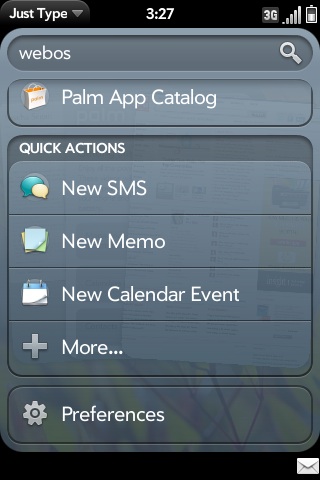
Just Type
It enables me to quickly and easily find/search both locally and on the internet. For example If I wanted to find out where Pecroino Sardo came for, I simply swipe up and start typing and I can choose to search for it using twitter, wikipedia and the internet. I can also instantly see how many emails and messages contain that term. You can also add custom search engines (e.g. WordPress), if a website supports just type a notification will pop up at the bottom of the screen and you can install it.

Stacks
Stacks, are a simple but very well thought out idea. As we know WebOS is a true multitasking OS but having multiple cards open can make linked information hard to track. Stacks solve this by stacking (shocking I know!) related items on top of each other. So if I have an email with a hyperlink in it, if I choose to open that link it will stay with that email rather than go to the end of the card list. Both are brilliant ideas and available no where else, these are the features that HP need to be screaming from billboards, but that’s a different subject for another time.
Overall the Pre 2 is an improvement, its not perfect but I am making it my main phone, which is as close to a ringing endorsement as you can get.
HP TouchPad in Education, an opportunity?
State of the Union:

HP TouchPad
- #1: The iPad is the only tablet around in the mind of the consumer, that 90% market share that Apple cited during the iPad 2 launch is no joke.
- #2: The iPad is not perfect
The iPad has driven tablet prices to a hitherto impossible level (see the multitude websites stating the iPad 1 would launch for £999 or similar) and most if not all tablet manufacturers are a year later still scrabbling to catch up. I don’t think that Apple will cede the number one position anytime soon, the total ecosystem it offers is difficult for individual suppliers to combat.
As we all know the UK Education market has been ravaged by cuts and tightening of ICT budgets, institutions nationwide (and globally for that matter) are having to do more with less. At the same time mobile devices are becoming more prevalent both in and outside of education. The iPad has achieved two things, first its created the mindshare for what tablets can do and secondly its raised the bar for what is acceptable for a tablet.
This is a doubled edged sword as its created demand for the device but at a time where investing £399 in a mobile device is difficult to justify.
This become all the more difficult when you try to integrate the iPad into your existing education environment:
- iPads offer no access to the file system so do not work with VLE’s (i.e. you can’t upload into areas)
- Schools can’t use systems like drop box due to third party data protection issues
- You cannot bulk specify a proxy, even with the iPhone configuration meaning that a tech will have to manually enter it on each iOS device (fine for one class, not for an entire school)
- A iPad can only sync with a total of five machines, yet does not offer any out of the box cloud/wireless ways of transmitting content
- iPads are poor content distributors i.e. give a student a task that requires them to create and then share content with the teacher and it will in most cases require 3rd party work arounds
In short the iPad creates fundamental barriers to integrating it into education and Apple is unwilling to help ‘We’re not looking to go in that direction’ is a response I’ve received from an Apple engineer when discussing the above issues. In spite of this, they are the number one requested item by teachers and because of this I think that HP has a distinct opportunity to flourish in the education sector as the only credible alternative to the iPad.
Lets not forget the elephant in the room, Android.
Android tablets fall into two catagories, cheap and nasty or prohibitively expensive. Add to this the lack of a consistant UI (although this may change with Honeycomb) and a lack of tablet formatted apps stacks the deck against wide scale adoption of the platform.
Try to convince a user:
- ‘So it’s cheaper than the iPad?’ No
- ‘Ah so that means it must be lighter!’ No
- ‘But it must have hundreds of tablet Apps!’ No
What is the incentive for the user to invest?
This is the issue that manufacturers of Non – iPads face, everything you do, all of your services are going to be compared to the iPad, whenever I talk about the Xoom, TouchPad to people the word tablet fails to have any resonance ‘Oh you mean an iPad…’. Manufacturers need to understand is that the product they are going to buy is an iPad, unless you give them a damn good reason not to. This is clearly demonstrated by the lack of interest in the Motorola Xoom despite having impressive specifications 1280 * 800 resolution screen, 1GB ram, dual core processor etc it means nothing to most users.
TLDR? In short being better wont win the war.
So is HP doomed? I’m not sure.
At WebOS Connect I saw a presentation by Ben Tattersley on his experience as a both Student learning WebOS and as Teacher showing others how to develop WebOS Apps. Ben went on to discuss the success of teaching students WebOS because of the low cost of investing in the platform due to its HTML/Javascript nature. That means a student does not need to buy a new Mac or PC , they can develop everything they need at home and in School.
And it hit me, there’s the hook, the USP for use of the TouchPad within education, it goes a little something like this:
- Offer a slight discount on the hardware, it doesn’t have to be massive but enough for the cheapest model to undercut the 16gb iPad
- Offer a training program for Teachers to learn about WebOS and how develop Apps for themselves
- Offer on site support to those Teachers when they teach these classes
Think of the PR potiential of the above:
- The School gets devices at a discount
- Students get not only access to devices but learn marketable skills for the future
It means that HP doesn’t just sell devices, it offers the those that invest in the TouchPad opportunities to enhance their Students career potential.
Apple is doing everything it can to hold itself back in the market, HP has a real chance to capitalise on it but only if it offers something different.
Tick tock
The clock is ticking, I dont feel that the HD7 is going to be staying in L’s ownership for long.
The reason? Stability.
The HD7 seems to crash a lot, combine this with random graphical glitches and a it doesnt make a convincing long term package. She has also noticed the lack of cut copy and paste (I had failed to mention it before hand…), she still likes the phone but the honeymoon period is well and truly over.
In fact I’m glad that she isn’t a massive multitasker as if she were, it would highlight another drawback in WP7…
Now we know that there is an update coming through to WP7 later on this week (hopefully) this will bring improved memory management which will speed up application, stability fixes and copy cut and paste (but not in third party apps unless they use the textbox control).
Will it give the HD7 a shot in the arm? Only time will tell
First steps
So L has had the HTC HD7 for a few days now, I thought it was high time to post her initial impressions beyond the industry standard new thing = awesome.
Overall impression? Not bad, but not great.
Her issues are not necessarily legion but there are a couple of sore points, namely battery life, stability and speed.
Low power:
L has a long commute into London each day meaning that any of her phones spend a long time surfing the net on 3G, playing music and either reading a book (more on that later) or playing a game. On top of this you add the oh so lovely live tiles that constantly poll various sources (FB/Gmail/Photostreams etc) for new content and display on the home screen. All of this consumes a lot of power and being that the battery is a meager 1280 MA/H doesn’t bode well. First day out in the real world and the battery lasted about eight hours, which is frankly appalling (it died 20 mins into her journey home), now there are a couple of things she can do to reduce the load on battery (turn off 3G, Live Tiles etc), she can invest in a 1500 MA/H battery or she can get a cable for work.
All of which she can do, but she shouldn’t have to, HD7 needs to be able to provide a full day of power considering the relatively light usage its being put through.
Spit and Polish:
Windows Phone 7 is lovely to look, use, apart from the crashing. L has experienced multiple app crashes and system lock ups requiring full restarts of the phone. It’s a real shame as the UI is leagues ahead of what other providers are putting out. Which leads me on to the next issue
Speed:
There’s no way to sugar coat it, WP7 feels slow at times, especially opening third party apps, now I’m holding fire on fully damning it as their is an upcoming update that is supposed to increase speed across the board.
So all negative then?
Far from it, the screen is large (4.3 inches) which makes reading books a lot easier even if the DPI isn’t up to my iPhone 4, the larger screen makes reading far more comfortable. The Marketplace offers enough distractions and the hardware instills confidence.
Probably the most over looked feature is Windows Connect.
This tiny application (40mb) e makes the migration process all the more palatable as it give you the ability to access your iTunes library, meaning that any podcasts/mp3/4 etc available to on iTunes (DRM’d aside) is accessible to your WP7 mobile.
It’s small light and fast and gives you the access to iTunes you need without any of the bloat, heaven.
We’re both holding judgment until the fabled update rolls out but the Windows Phone 7 platform definitely shows promise and at this early stage that’s enough.
So what next?
You may, or may not have noticed the release of Microsofts Kinect last week but if you did miss it, I think you should take a look at these videos:
Granted its early days but if this is what can happen from a week of hacking, just imagine what could be possible later on down the line.
Someone should hire this guy asap.
So what does this have to do with e-learning? Everything.
By removing the controller we can engage a whole scope of learners, be young or old and I think it has significance to those learners with a learning or physical disability. You don’t need to be dexterous or capable of pressing small buttons, Kinect makes you the controller.
This is the first console based augmented reality device that actually has a chance of succeeding, granted the initial launch line up isn’t chock full of AAA games but, Dance Central, Kinect Sports & Kinectimals do a pretty decent job.
I hope that an E-Learning games company does launch software on Kinect, I think it has far more potential for learning that the already impressive Wii.
First base
This post is a day late, mostly as I was nursing quite a large hangover which meant the creative juices weren’t exactly flowing.
So how has it gone?
So far so good, I managed to get the phone set up play with the gesture tutorial and then I started with Synergy. Big mistake on my part as I had forgotten to sync my contacts to my sim card prior to resetting my iPhone which meant that the ones the Pre now had were at least a year out of date.
Joy.
For those unfamilar with ‘Synergy’ its Palm ethos that you should be able to sync all of your contacts from a range of different sources(Facebook, Gmail, Sim card etc) which is great in theroy but can lead to frustrations. Namely the fact I have ALL of my Facebook friends on my contacts list, which is fine for me as I’m a big proponent of ‘Friend Culls’ meaning that most of my friends in Facebook are actually people I physically know. The big drawback is that once you’ve added your facebook contacts, you can’t delete them from your contact list without deleting them from facebook first. This is further compounded by the fact that not everyone has their mobile numbers in Facebook (I certainly don’t) which creates a fair number of useless entries that just seek to take up space in your phonebook and you can’r remove.
So the first half hour of the my life with the Pre was spent sorting out the large mess of contacts into one list (lots of clicking, copying pasting and deleting), not the best way to be introduced to the phone.
Annoying.
Afterwards I setup my App Catalog account and put a card onto it, which almost didn’t work because the App Catalog only appears to accept Visa and Mastercard, luckily it seem to accept my Visa Debit card and all was well, I’m getting a feeling that this lack of clarity on certain sections is going to be an every present theme during my time with the Pre. So now I was all set up and good to go, it was time to get some Apps, now I know the App Catalog is threadbare in comparison to the iPhone and I had indentified that I only really use three core apps (Facebook, Twitter and Web browsing), all of which are easily available via the Pre (I’ve selected Bad Kitty as my twitter client of choice). I haven’t really spent much time looking at other apps although I may later on today.
I should take a minute to talk about the keyboard, its not great but I’m certainly getting used to it although I’m not nearly as fast as with an iPhone and the lack of autocorrect is a major oversight by Palm. On a side note its a lot harder to type on when you’re in bed as the slider makes the phone top heavy leading to potential a TKO as you inevitably drop the phone on your forehead.
But this all sounds a bit negative right? There are many things that I love about this phone. I love the feel of the phone in my hand, many reviews have made mention of the polished stone feel of the Pre and I heartily agree, its very satisfying to hold. Another is its beautiful approach to multitasking and the coup de grace, its notification system. Now I can understand if you don’t quite have a passion for smart notifications that I do, but that’s because you may not have been an iPhone user. Let me explain, Palm and Apple have two distinctly different approaches to how they think you should be informed of something happening on your phone. Palm method can be equated to being gently tapped on the shoulder and discretely informed that you have a new text message by popping up a small notification at the bottom of the phone. Apple prefer to use a modal pop up that is akin to being grabbed by the shoulders and told HEY YOU HAVE A MESSAGE, READ THE MESSAGE, COME ON READ IT NOW!!!!!!! It will also not release control of the screen until you’ve either read it (closing your existing app and opening the message one) or dismissing it and returning to whatever it was that you were doing. Nothing makes me angrier than crashing during a race just because someone text me and that’s the reason I switched from the iPhone.
So at the end of the first day I’m up and running but apart from the notifications system, I’m not bowled over but that’s not to say I don’t like the phone, far from it. It currently satisfies most of my smartphone requirements, the question is can I find something to keep me here as the iPhone 4 is looming large in my mind.
That’s the mission kids, we’re about a week and a bit away from the iPhone launch and I’m still tempted but I think I will give the Pre a month to prove itself.
After all the iPhone will always be there.
Action stations
Finally got back from Belfast at 11pm, I treated myself to 2 double cheese burgers, small fries and a small coke at the airport (about a million calories, but I’m going running tonight so it should balance out), 19 hour days on 2 hours sleep are awesome!
Anyhow, moving on.
With yesterdays post about app stores being the ties that bind us to a particular platform I decided to put my money where my mouth is.
As you may know I sold my iPhone 3G a couple of days ago and am now phoneless (save for a work blackberry), my plan was to get this:

With stunning features such as a screen and keypad
As it would do for now and the plan was going really well until I got the o2 shop and they said they wouldn’t sell it without £10 credit, which means the phone becomes £20 and much less tempting. I then played with a couple of phones, including the new Pre Plus and left the store, resolute in my new plan, to not have a phone.
But during yesterdays trip to belfast, it would have been nice not to have to bring out my laptop just to check my email (I know a stunning observation) and a BlackBerry Curve isn’t the greatest phone to use. So I then thought of a third plan: I could get a new smartphone on contract, use it for two weeks and then return it during the cooling off period and get an iPhone, genius eh? Except that the week of the iPhone launch I’m in Blackburn doing training meaning I wouldn’t be able to send the phone back.
Plan four!
I’d just got into bed last night and was at that point where I was so tired that I couldn’t sleep, so out came the hackintosh for some idle surfing.
And lo I surfed high and low, forums, blogs, wiki’s and then inevitably to eBay. I’ve been thinking a lot about the Pre of late, no phone has really captured my ADD attention like it, but they are all too expensive £160-170 (far too much to play around with) and I wasn’t sure if I would be able to sell it on for the same price. So I do what anyone would do, I started messaging people on ebay asking them for BIN or if they would reduce their asking price.
I wasn’t expecting any takers at my offer of £120 + pnp but you gotta chance your luck sometimes.
And then, something unexpected happened, I got a bite. I knew it was worth a shot being that the Pre is deffinatly a phone unloved by the masses (but with a solid if tiny hardcore developer community) and with the new iPhone coming people are probably looking to shift handsets quickly but still.
So I’ve got a 2 month old Pre £120, its coming tomorrow and no doubt you think I’m crazy but lets look at the TCO:
LG dumbphone £20 (£10 phone with £10 useless credit as I’m on contract)
Palm Pre £120
Now, on looking at it the Pre is far more expensive but I did get it cheap and I know I can sell it for at least £100 in three weeks time. Making the total cost of ownership (less shipping and app purchases), £20.
And I don’t know about you but I think that’s pretty decent price to pay.
 If not now, then when?